


CG vs. CGI Meaning, What Is the Actual Difference?

The terms CG (Computer Graphics) and CGI (Computer-Generated Imagery) are often used interchangeably in the film, gaming, and 3D industries. However, they refer to two related but distinct concepts.
Computer Graphics (CG) describes the broader technological field dedicated to generating and manipulating images using computers. It includes the mathematical models, algorithms, software, and rendering techniques used to create digital visuals.
Computer-Generated Imagery (CGI) refers specifically to the visual images or animations produced using those technologies, commonly used in films, video games, advertising, and visual effects.
In simple terms:
- CG is the technological discipline
- CGI is the visual output produced by that discipline
Understanding this distinction is essential for anyone working in 3D production, animation, visual effects, or digital media pipelines.
What is CG (Computer Graphics)? The Foundation of Digital Art
Computer Graphics (CG) refers to the field of computing dedicated to generating and manipulating visual content using digital systems. It encompasses everything from simple 2D interface graphics to complex 3D simulations and photorealistic rendering used in modern cinema and engineering.
Because of its broad scope, CG forms the technical foundation behind almost all digital visual production. Any image, model, animation, or simulation created digitally relies on computer graphics principles.
Industries that rely heavily on CG include:
- film and visual effects
- video games and interactive media
- architecture and product visualization
- scientific and engineering simulations
In practice, CG is not limited to artistic production. It also involves mathematical modeling, geometry processing, lighting simulation, and rendering algorithms that make modern digital imagery possible.
This technological framework is what ultimately allows artists and studios to produce computer-generated imagery (CGI) used in entertainment and media.
Raster vs. Vector Graphics: The Building Blocks
One of the most fundamental distinctions in computer graphics lies between raster graphics and vector graphics.
Raster graphics represent images using pixels arranged in a grid, where each pixel contains color information. This format is ideal for photographs, textures, and rendered images where fine visual detail is required.
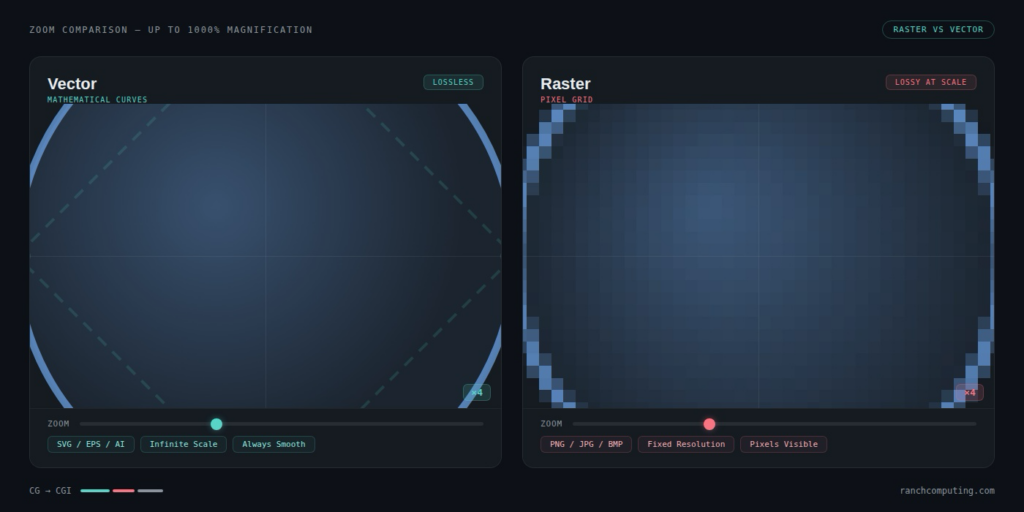
Vector graphics rely instead on mathematical formulas describing shapes and curves. Because they are defined by equations rather than pixels, vector images can be scaled infinitely without losing quality.
Both approaches play an essential role in CG pipelines:
- Raster graphics dominate rendering outputs and textures
- Vector graphics are widely used for design elements, UI graphics, and scalable illustrations
Understanding this distinction helps explain how digital images are stored, manipulated, and rendered across different creative workflows.
Interactive CG: Gaming and Real-Time Environments
Another important branch of computer graphics is interactive CG, which powers video games, simulations, and virtual reality environments.
Unlike cinematic rendering, where images are calculated offline and may take minutes or hours per frame, interactive CG must generate images in real time, typically at 30 to 120 frames per second.
Game engines such as Unreal Engine and Unity rely on optimized rendering pipelines capable of computing lighting, physics, and geometry instantly.
This real-time approach is now influencing film production through technologies such as virtual production, where large LED stages display environments rendered in real time while actors perform in front of them.
As real-time rendering becomes more powerful, the traditional boundary between interactive CG and cinematic CGI continues to blur.
What is CGI (Computer-Generated Imagery)? The Creative Output
While Computer Graphics describes the technological field, Computer-Generated Imagery (CGI) refers to the visual images produced using those technologies.
CGI is the practical application of computer graphics techniques to create images, animations, and visual effects used in films, television, video games, advertising, and simulations.
These images can be either static (still images) or dynamic (animation sequences). In modern media production, CGI is often associated with 3D environments, digital characters, and cinematic visual effects.
In other words:
- CG provides the technical tools and algorithms
- CGI represents the final visual result seen by audiences
Because of this role, CGI is central to modern digital storytelling. It allows artists to create worlds, characters, and visual phenomena that would be impossible or extremely expensive to film using traditional techniques.
VFX and Animation: Transforming Modern Cinema
CGI has fundamentally transformed the film industry by enabling large-scale visual effects and fully animated films.
Some landmark productions illustrate how CGI reshaped modern cinema.
For example, Jurassic Park (1993) demonstrated that computer-generated creatures could convincingly interact with live-action footage. The realistic digital dinosaurs created for the film marked a turning point in visual effects technology.
A few years later, Toy Story (1995) became the first feature-length film created entirely with CGI animation, proving that full cinematic narratives could be built entirely from digital imagery.
Since then, CGI has become essential for blockbuster productions. It is now used to create:
- digital creatures and characters
- massive environments and cities
- crowd simulations and large battle scenes
- destruction effects and physics simulations
These techniques allow filmmakers to create immersive visuals while maintaining complete creative control over lighting, camera movements, and environments.
Motion Capture: Merging Human Performance with Digital Models
One of the key technologies used alongside CGI is motion capture (MoCap).
Motion capture systems record the movements of actors using sensors placed on their bodies. These movements are then transferred to digital characters, allowing CGI models to replicate human motion with remarkable accuracy.
This technique is widely used in both film and video games. It enables animators to preserve subtle details of human movement—such as body posture, facial expressions, and timing—while applying those performances to entirely digital characters.
By combining motion capture with CGI rendering, studios can create characters that feel realistic and emotionally expressive while still existing in fully digital environments.
Motion capture has therefore become a critical component of modern CGI pipelines, especially in high-budget productions and AAA video games.
Comparative Analysis: Key Differences Between CG and CGI
Although CG and CGI are closely related, they serve different roles within digital production. CG refers to the underlying technological field, while CGI represents the visual results produced using those technologies.
The distinction can be summarized in the following comparison.
| Criteria | CG (Computer Graphics) | CGI (Computer-Generated Imagery) |
| Definition | The technological field dedicated to creating and manipulating digital images using computers | The specific images or animations produced using computer graphics techniques |
| Scope | Broad discipline including modeling, rendering, visualization, and simulation | Subset of CG used mainly for film, games, advertising, and media |
| Primary Goal | Development of tools, algorithms, and rendering technologies | Creation of visual content and storytelling |
| Examples | Rendering engines, graphics pipelines, modeling tools | Movie VFX, animated characters, digital environments |
In practical terms, CG provides the tools and technical processes, while CGI represents the artistic output created with those tools.
The Production Pipeline: How CG Becomes CGI
Transforming computer graphics into finished imagery requires a structured production workflow known as the 3D graphics pipeline.
This pipeline represents the sequence of steps used to convert a virtual 3D scene into the final pixels displayed on a screen.
Although workflows vary depending on the project, most CGI productions follow three fundamental stages:
- Modeling – creating the geometry of objects, characters, and environments
- Texturing and shading – defining surface properties such as color, roughness, and reflectivity
- Rendering – computing lighting and camera interactions to generate the final image
Additional stages such as rigging, animation, lighting, and compositing are often included in larger production pipelines, especially in film and visual effects.
Together, these stages transform abstract computer graphics data into finished cinematic imagery.

Rendering: The Final Bridge to Photorealistic CGI
Rendering is the stage where the entire scene—geometry, materials, lighting, and camera settings—is converted into the final image.
This process is computationally intensive because it requires simulating how light interacts with surfaces in the virtual environment. Modern rendering engines often rely on ray tracing, a technique that traces the path of light rays through a scene to produce realistic reflections, shadows, and global illumination.
Ray tracing significantly improves realism, but it also increases computational cost. Rendering a single frame of a complex scene can take several minutes—or even hours—depending on:
- scene complexity
- number of light sources
- resolution and sampling settings
- texture sizes and geometry density
When multiplied across hundreds or thousands of frames, rendering quickly becomes the most resource-intensive stage of the CGI pipeline.
CPU vs. GPU Rendering: Choosing Your Hardware Power
Rendering workloads can be processed using either CPU-based rendering or GPU-accelerated rendering.
CPU rendering relies on multi-core processors capable of handling complex calculations across many threads. High-performance render nodes often use server-grade processors such as AMD EPYC, which provide dozens of cores designed for parallel workloads.
GPU rendering, by contrast, leverages graphics processors capable of executing thousands of parallel operations simultaneously. Modern GPUs—including high-end RTX architectures—are optimized for rendering tasks and can dramatically accelerate certain rendering engines.
However, GPU rendering introduces its own constraints, particularly VRAM limitations, which can restrict scene complexity when large textures or geometry datasets are involved.
Because modern CGI scenes continue to grow in complexity, many studios supplement their local workstations with additional compute infrastructure when rendering large projects.
| Technical Criteria | CPU Rendering (Precision & Volume) | GPU Rendering (Speed & Iteration) |
|---|---|---|
| Hardware Generation / Nodes | High-density nodes equipped with AMD EPYC processors (Milan/Genoa series). | Multi-generational fleet: RTX 3090, 4090, and the new RTX 5090. |
| Memory Capacity (VRAM / RAM) | Direct access to system RAM: 128 GB, 256 GB, or even 512 GB per node. No risk of “Out of Memory” errors. | Limited by the card: • RTX 3090/4090: 24 GB • RTX 5090: 32 GB |
| Ideal Scene Profile | Extremely heavy projects, Houdini simulations, ArchViz with billions of polygons, and uncompressed textures. | Optimized projects, Motion Design (C4D/Redshift), environments in Octane or Blender Cycles. |
| Scalability at Ranch | Ability to distribute rendering across hundreds of cores for perfect stability. | Raw computing power multiplied by stacking high-end cards in parallel. |
| Target Render Engines | Arnold, V-Ray CPU, Corona Renderer, RenderMan. | Redshift, OctaneRender, V-Ray GPU, Cycles, FStorm. |
Professional Software and Engines for High-End CGI
Producing high-quality CGI requires specialized Digital Content Creation (DCC) software combined with advanced rendering engines.
The most widely used 3D software includes:
- Autodesk Maya – widely used in film and VFX production
- Blender – popular open-source software for modeling, animation, and rendering
- 3ds Max – widely adopted in architectural visualization and product design
- Cinema 4D – commonly used for motion graphics and advertising
These applications provide the tools required for modeling, rigging, animation, lighting, and scene assembly.
However, the final visual quality of CGI is largely determined by the rendering engine used to compute the final images.
Popular render engines include:
- Arnold – widely used in film pipelines for physically accurate rendering
- V-Ray – widely adopted in architecture and product visualization
- Corona Renderer – known for simplicity and photorealistic lighting
- Redshift – GPU-accelerated rendering optimized for speed
- Octane – real-time GPU ray tracing engine
Each renderer offers different strengths depending on whether the production prioritizes photorealism, rendering speed, or GPU acceleration.
Emerging Trends: AI, Real time
The CGI industry is evolving rapidly as new technologies reshape digital production workflows.
One major trend is AI-augmented rendering. Machine learning algorithms can now remove noise from partially rendered images, allowing artists to achieve clean results with fewer samples and significantly shorter render times.
Another major transformation is the rise of real-time rendering.
Game engines such as Unreal Engine are increasingly used in film production through virtual production techniques. Instead of waiting hours for offline rendering, directors can visualize environments instantly on LED stages while filming actors.
These innovations are gradually blurring the boundary between traditional offline CGI and interactive computer graphics.
The future of CGI production will likely combine real-time rendering, AI assistance, and cloud-based compute infrastructure to handle increasingly complex scenes.
Overcoming CGI Bottlenecks with Ranch Computing
Despite advances in rendering technology, rendering remains one of the biggest bottlenecks in CGI production.
Modern scenes often contain:
- millions of polygons
- complex ray-traced lighting
- high-resolution textures
- simulation data for particles, fluids, or crowds
These workloads can quickly overwhelm even high-end workstations.
This is why many studios rely on cloud rendering services, also known as render farms. Render farms distribute rendering tasks across many computers, allowing frames to be calculated in parallel and significantly reducing total rendering time.
Ranch Computing is one of the cloud rendering platforms designed specifically for this purpose. Founded in Paris in 2006, the company provides powerful CPU and GPU servers that allow artists to render complex CGI projects without relying solely on their local hardware.
Instead of rendering frames sequentially on a single workstation, a render farm distributes frames across multiple machines simultaneously, dramatically accelerating production.
Cloud rendering platforms such as Ranch typically offer two main approaches.
Managed Render Farms
These services allow artists to upload scenes directly to a rendering cluster. The platform manages the infrastructure, making it easier to scale rendering power without maintaining local hardware.
Virtual Machine Rendering Nodes
Some studios require deeper control over their production pipelines. Dedicated servers with root access allow teams to configure rendering environments, install custom plugins, and integrate internal tools.
By using scalable rendering infrastructure, studios can reduce turnaround times and focus on creative production rather than hardware limitations.
Conclusion: Mastering the Vocabulary of Visual Art
Understanding the distinction between CG and CGI helps clarify how modern digital images are created.
Computer Graphics represents the technological field that makes digital imagery possible, including rendering algorithms, modeling tools, and visualization techniques.
Computer-Generated Imagery represents the final visual output created using those technologies—from animated characters to photorealistic environments.
In simple terms:
- CG is the technology
- CGI is the artwork produced using that technology
As rendering technologies evolve through real-time engines, AI-assisted workflows, and scalable cloud computing, the line between technology and artistry continues to blur.
For artists and studios working on complex productions, scalable rendering infrastructure now plays a key role in accelerating CGI workflows.
Ready to scale your CGI? Start your first render with €30 free credits.